
The new free alternative editor for the GT-1000 and GT-1000CORE.
Your whole chain on screen, with real pedals and amps, and many of the unit's features reorganized, reviewed and made easier to use. Connect by USB cable or Bluetooth, tap the tempo, organize your patches and back them up. Free, for Windows and Mac.
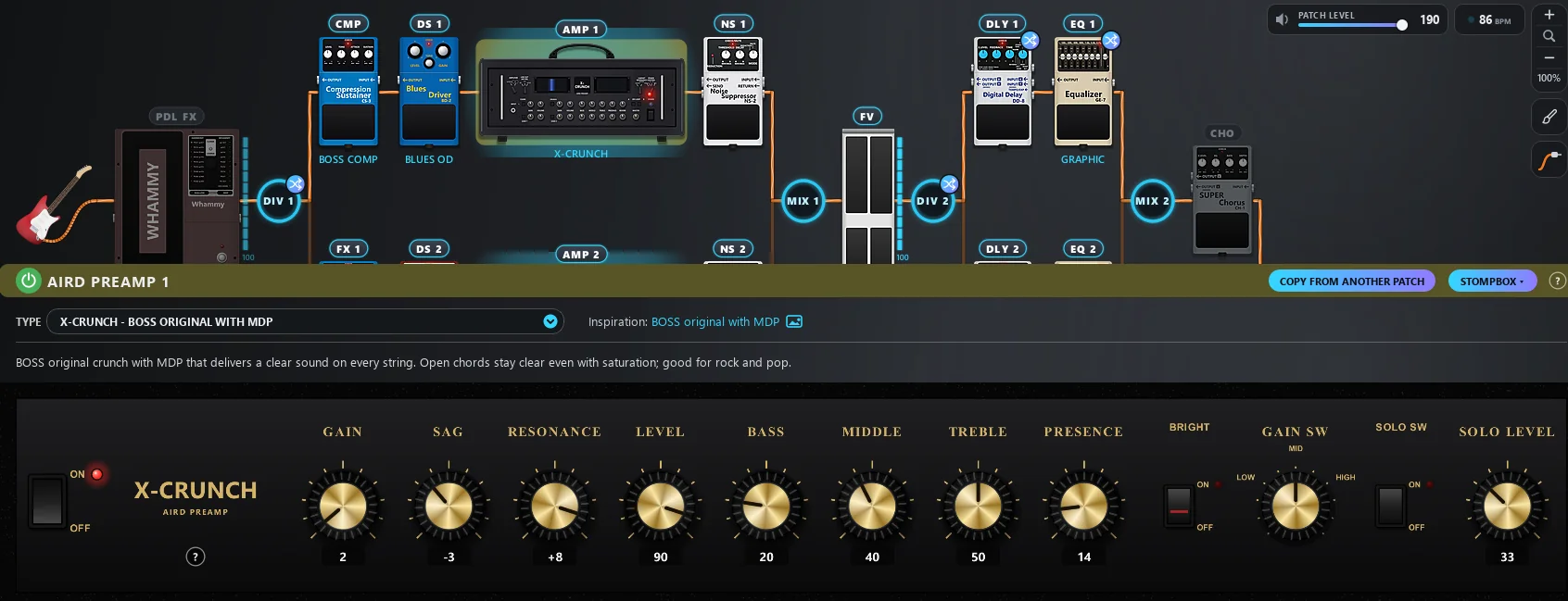
Everything the GT-1000 does, on a screen you'll enjoy using
The whole editor is free. Every pedal looks like a pedal, every amp has its own panel, and the whole patch shows at once.
Every button where your hand reaches for it
At the top, the unit's screens. Right below, the open patch and the everyday actions, in the order you use them. The new features came with their own buttons, no hidden menus.

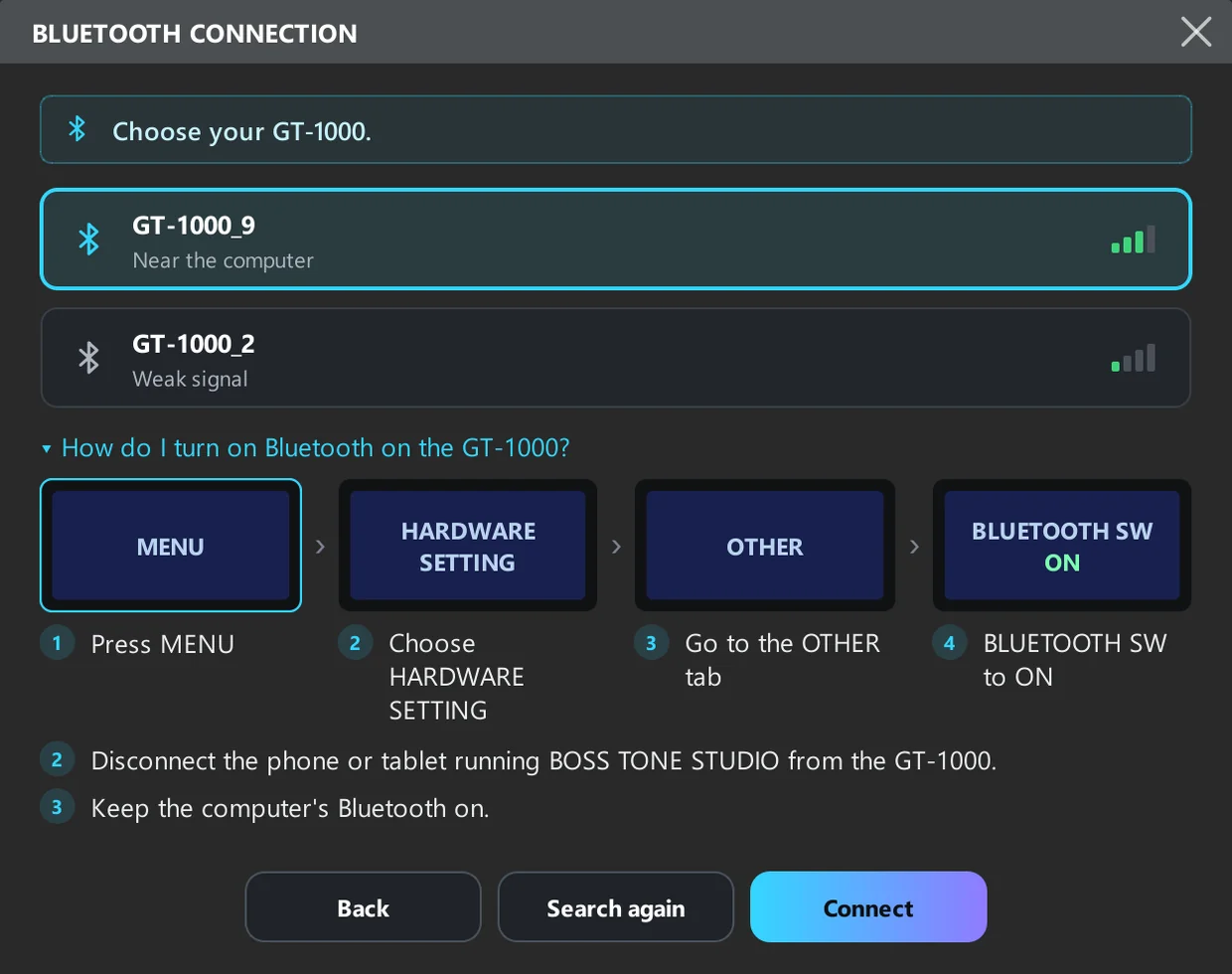
No cable: connect the GT-1000 via Bluetooth
On the GT-1000, the editor connects via Bluetooth: edit, switch patches and use the AI without the USB cable. The window shows step by step how to turn Bluetooth on in the pedal.
- GT-1000 only: the GT-1000CORE has no Bluetooth, so it connects with the USB cable
- Sound on the computer (audio interface) and LEVEL VOLUME still use the USB cable
- The editor remembers your GT-1000 and connects on its own next time
Click, stomp: the pedal reacts like the real one
Turning an effect on and off on screen feels like stepping on the pedal. The BOSS lid sinks on its hinge, the Tube Screamer switch goes down, and the LED lights up along with the unit.
- Over 130 pedals drawn as vectors, sharp on any screen
- The same stomp in the chain and in the large panel


The expression pedal moves up and down on screen
On the wah, the pedal bend and the volume, the LED meter fills and empties with the pedal position. Drag the meter with the mouse and the pedalboard responds live, great for finding the sweet spot of a fixed wah.
- Works for the PEDAL FX (wah, pedal bend) and the FV
- PEDAL MIN and MAX explained as heel and toe


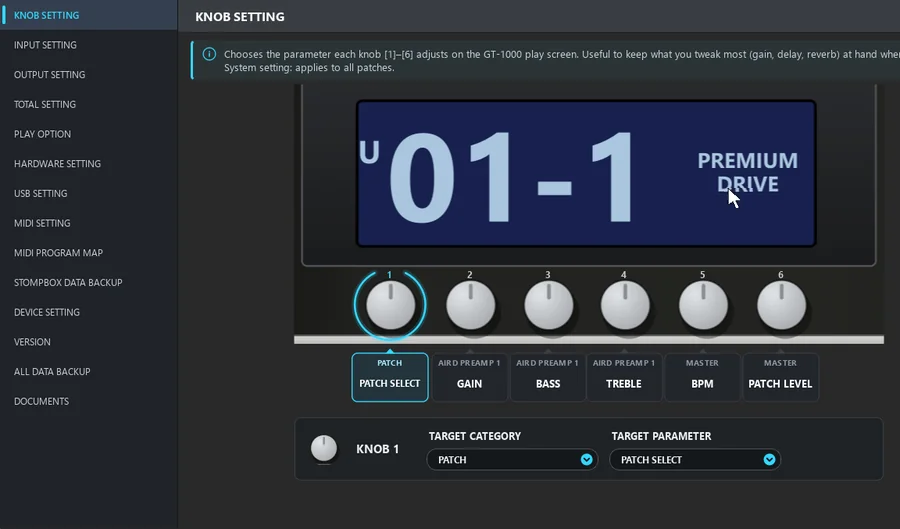
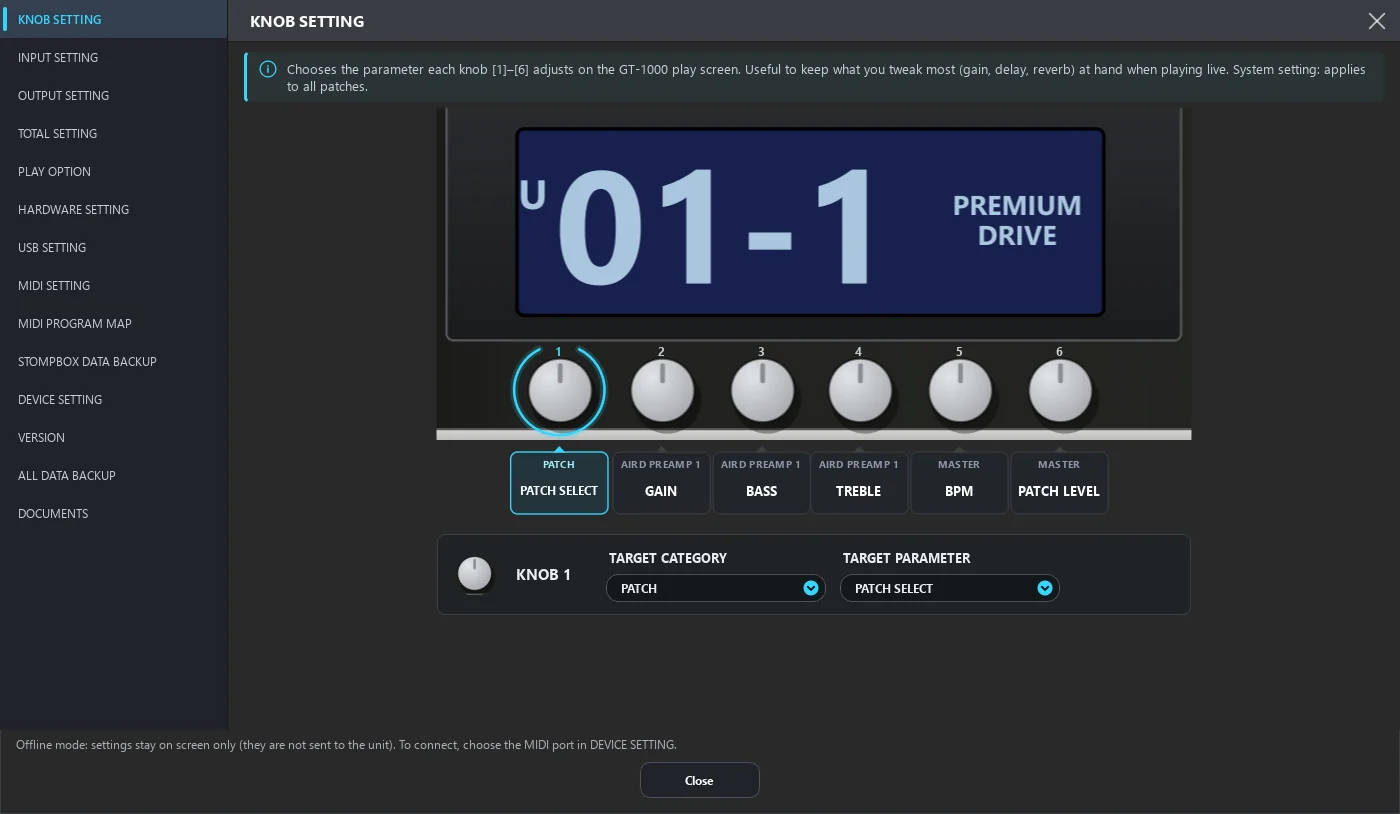
Choose what each knob on the pedal controls
In KNOB SETTING you set the parameter for each knob on the pedal's play screen: gain, bass, BPM, patch level… The editor shows the display and the knobs just like you see them on the GT-1000.
- Click the knob and pick the block and parameter
- Applies to every patch
- What you tweak most live is one turn away
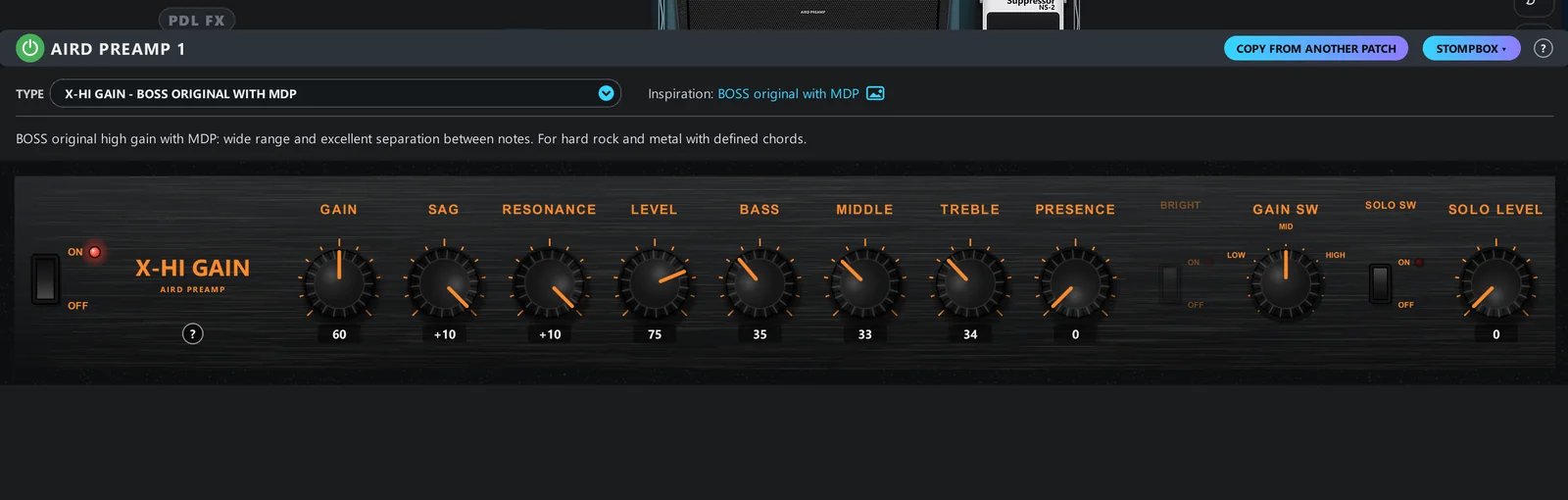
Every amp with its own panel and knobs
Pick the TYPE and the panel changes: cream tweed, gold stack, orange, silver JC. The knobs turn with the mouse and show the value below, like on the real amp.
- Every GT-1000 and GT-1000CORE amp with the look of the amp that inspired the model, no brand logos
- Number pad to type the exact value
- Parameters that don't apply to the current setting are dimmed, not hidden







Every pedal and amp tells you where it came from
In the TYPE list, each model shows the gear that inspired it. Pick one and the panel explains the sound, the history and who played the original.
- Inspiration next to the name, right in the list
- Notes on the sound and the artists who used it
- Choose by the gear you know from real life, not by a technical name
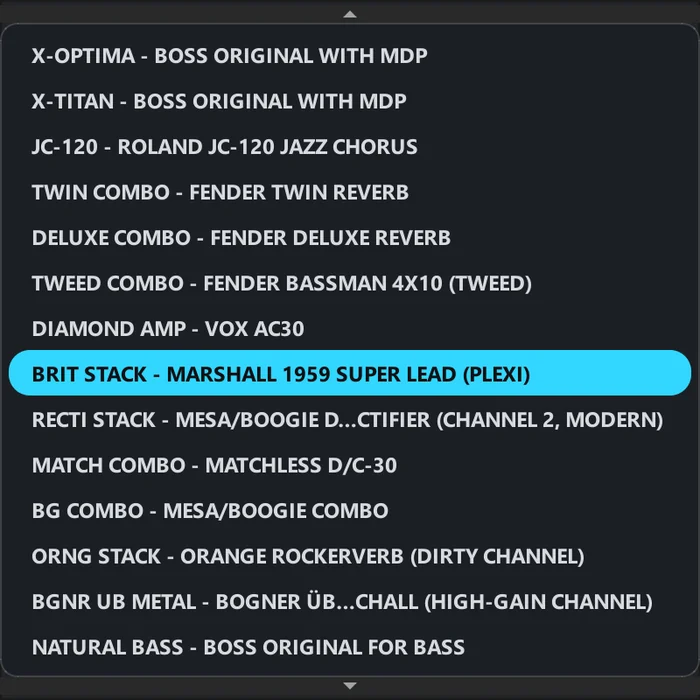
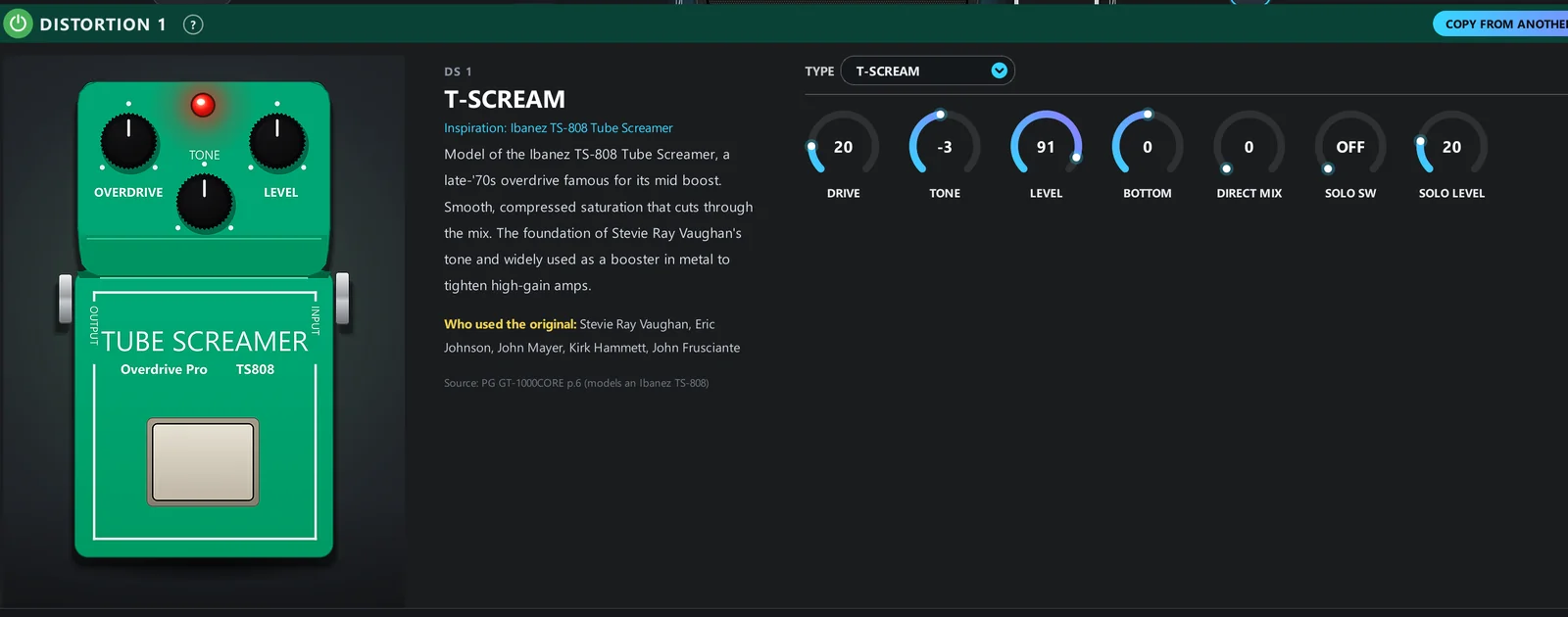
Forward mids and smooth saturation that cuts through the mix.
The 60s plexi: open crunch and bold mids.
High gain with huge lows, the weight of the 90s.
Gear and artist names appear only as a reference for inspiration.
Not sure what HIGH CUT does?
Hover and find out
Every parameter now has an explanatory hint: in the effects, the amps and the MENU. It appears instantly, with what the parameter does, its range and its current value.
- Explanations taken from the official guide, in plain language
- Redrawn figures where they help
- No opening the 100-page manual mid-edit


Right-click the pedal and the ASSIGN is done
Right-click a pedal in the chain, choose “Assign on/off to CTL/EXP” and pick the controller. The ASSIGN goes into the first free row, without opening the table.
- On a knob, the same shortcut: default value, type a value or assign to a controller
- Every controlled pedal gets the ASSIGN icon in the corner; hover to see the controller and what changes
- If the controller already does something else, you're warned before confirming

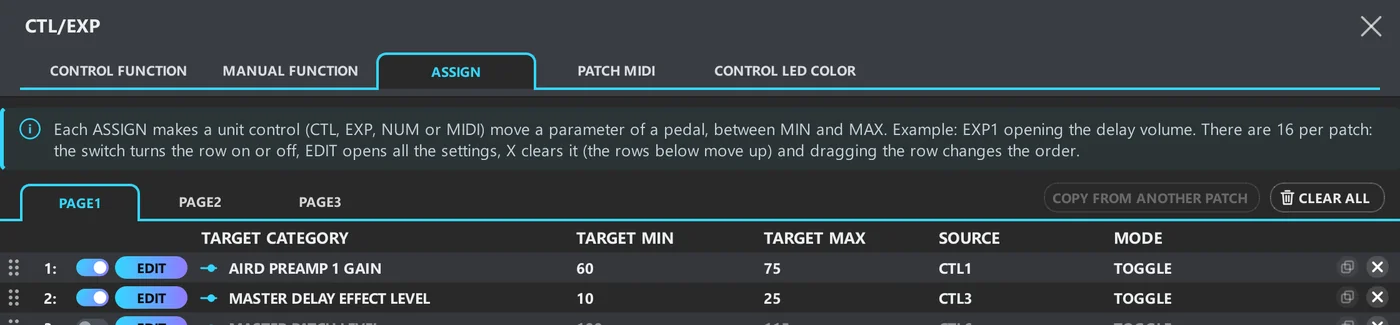
ASSIGN anyone can understand
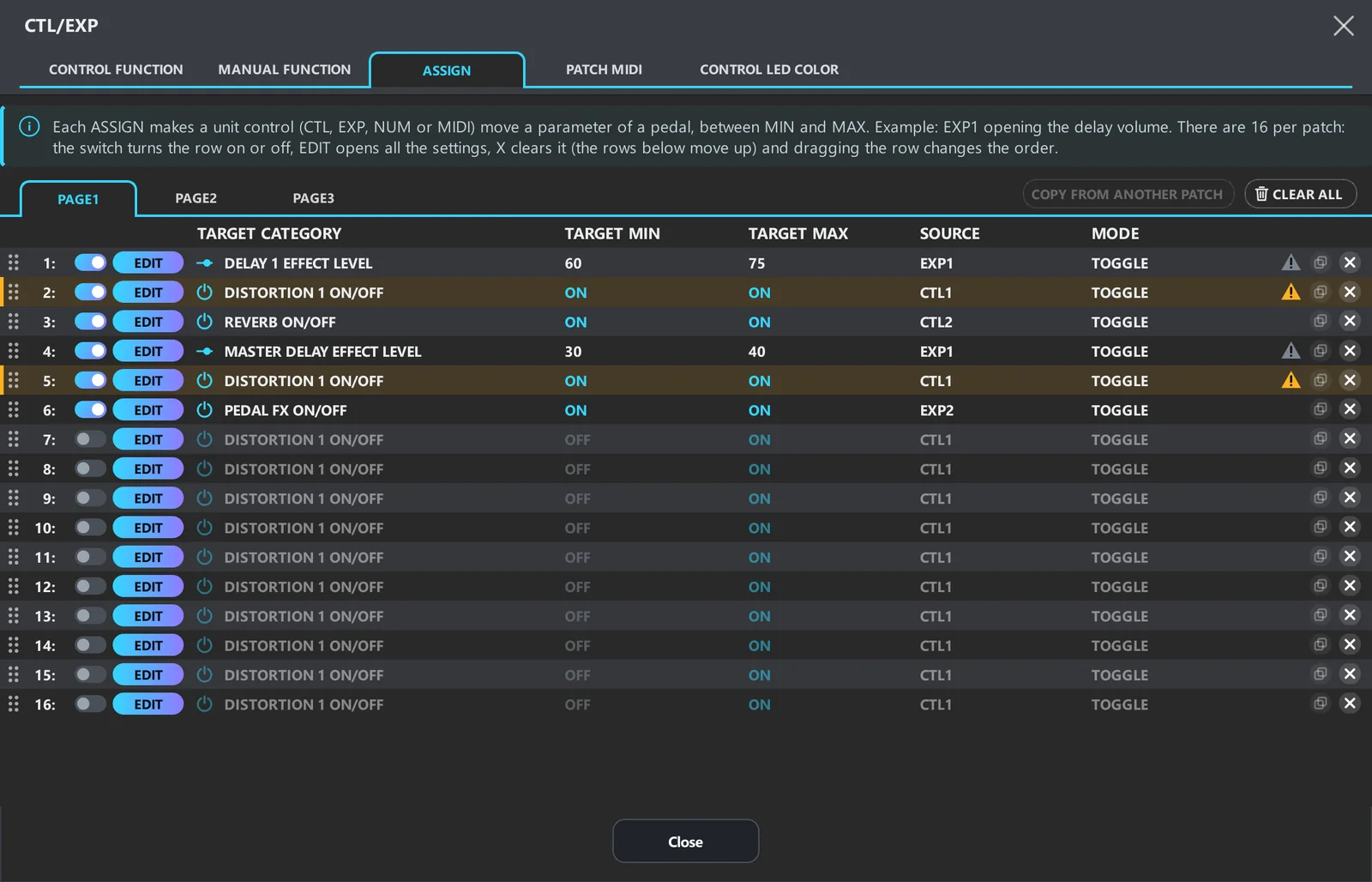
The most confusing part of the pedalboard became a clear table: who controls it, what changes, from what to what, and whether it's on.
- On/off per row, with the whole row draggable to reorder
- Clearing a row moves the ones below up; duplicate in one click
- A warning when two ASSIGNs clash, only when they target the same effect
- LED colors with a color dot next to the name, automatic ones included
- CONTROL FUNCTION, MANUAL FUNCTION and PATCH MIDI in the same window
One glance tells you if the patch has ASSIGNs
The CTL/EXP button shows a badge with how many ASSIGNs are on in the open patch. Click the badge and the ASSIGN table opens directly, no menus.
- The number updates the moment you turn on, turn off or create an ASSIGN
- In the chain, every controlled pedal gets the same icon in the corner


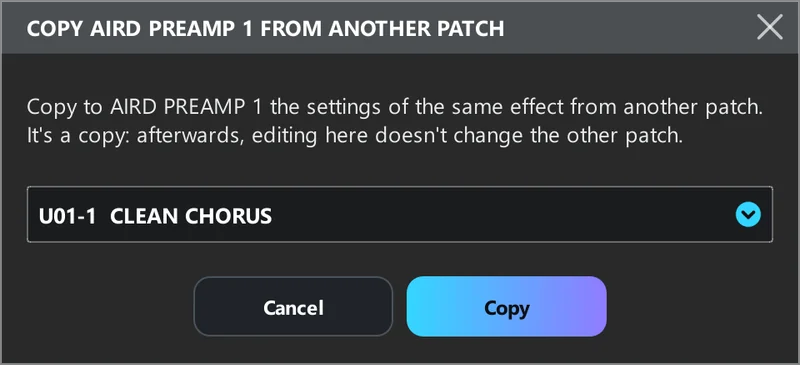
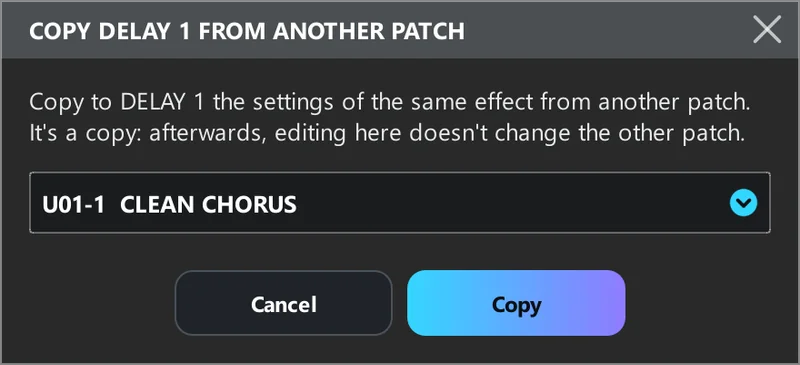
COPY FROM ANOTHER PATCH
That perfect amp sitting in another patch? Copy just that. It works for the amp, any effect and the ASSIGNs: pick the source patch and you're done. It's a copy, so later changes don't touch the other patch.
- On every amp and effect panel, next to STOMPBOX
- For ASSIGNs, tick the ones to bring and they go into the free rows
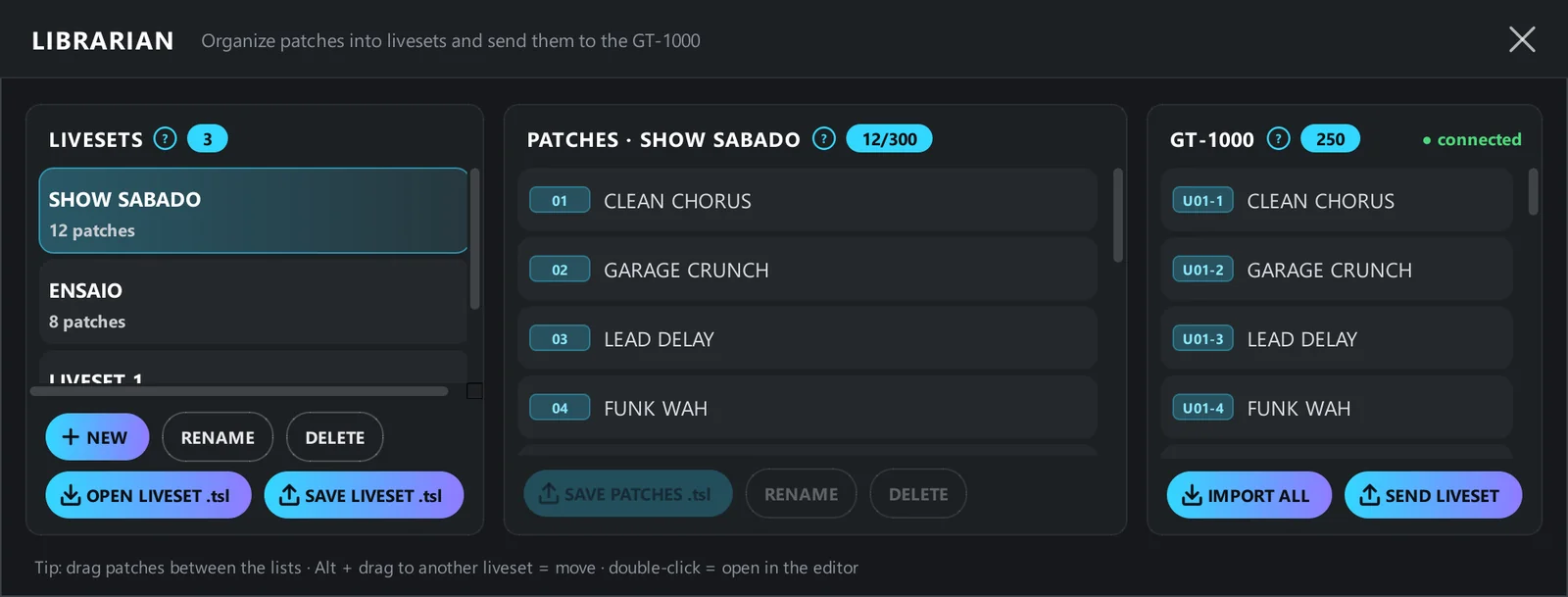
LIBRARIAN: your setlist organized in minutes
Three columns side by side: your livesets, the patches in the open liveset and the pedalboard memory. Drag from one to another and you're done.
- Imports all 250 patches from the unit at once and sends a whole liveset back
- Opens and saves .tsl compatible with BOSS TONE STUDIO, keeping ASSIGN, LED, CTL and memo
- Ctrl to select several and export them in one file; double-click opens in the editor
Drag the file in, it's imported
Drop a .tsl anywhere in the window. If it has several patches, you choose: open just one in the editor or send them all to the LIBRARIAN.

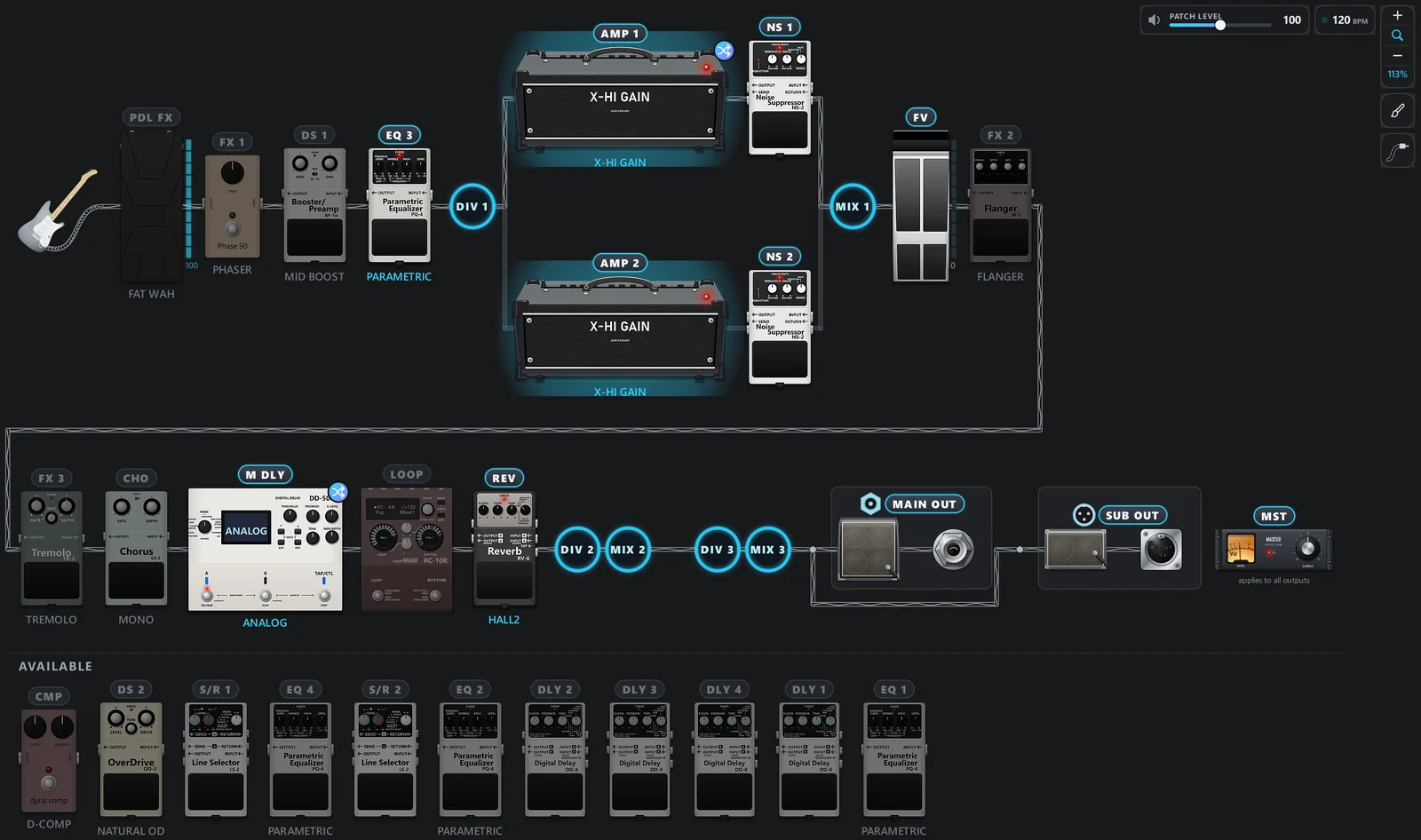
The whole chain, with the pedals outside it kept aside
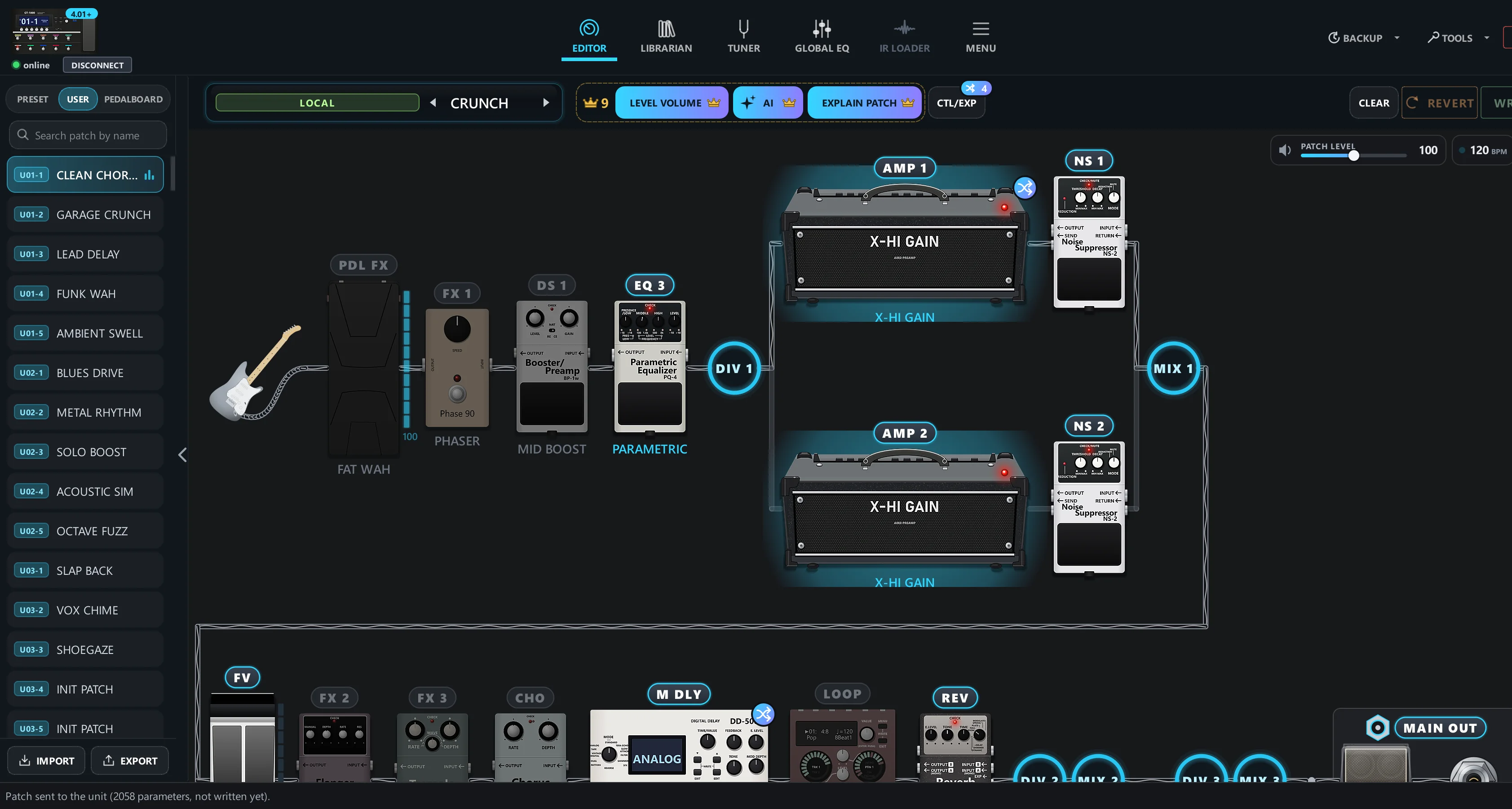
From the instrument to the outputs, in the real order, with dividers, mixers and MAIN and SUB outputs. Drag a pedal to reorder. Whatever you take out of the chain goes to the AVAILABLE row, off and with its settings kept.
- Double-click in AVAILABLE and the pedal goes back, on, to the same spot
- If a controller uses the pedal, the app warns you before removing it
Any size you want
Zoom the chain in or out with the magnifier in the right corner, or hold Ctrl and turn the mouse wheel. Click outside the chain and the bottom panel slides away like a tray: the chain gets the whole screen.
- The zoom is saved for next time
- Click a pedal and the panel comes back with it open


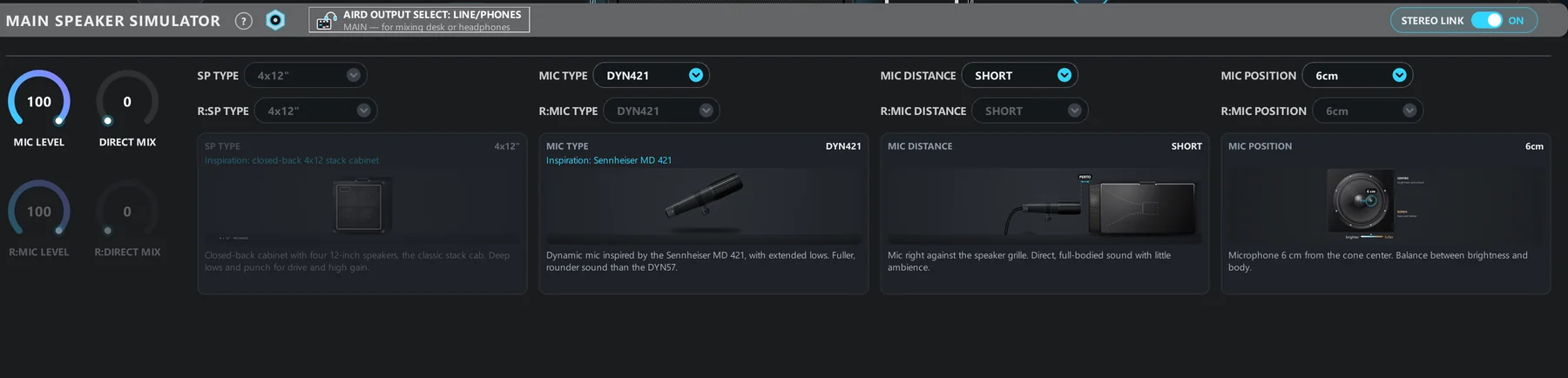
Outputs and SPEAKER SIMULATOR with the gear on screen
Where is the output connected? Pick it from the drawing: mixer, headphones, recording or your amp, with an explanation of what AIRD does in each case. In the SPEAKER SIMULATOR, each list sits above a drawing of the cabinet and the mic.
- Amps and stacks each with their own drawing, normal input or effects return
- Mics redrawn to match the real ones, with distance and position
- Output GLOBAL EQ one click away

Your way: cable, wave, background and instrument
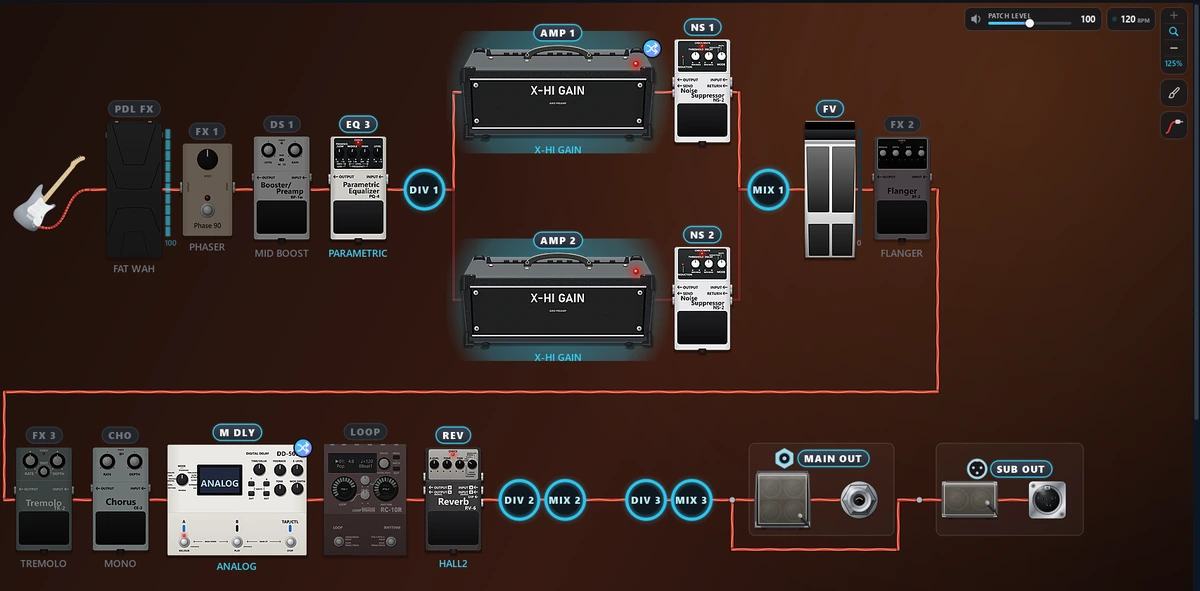
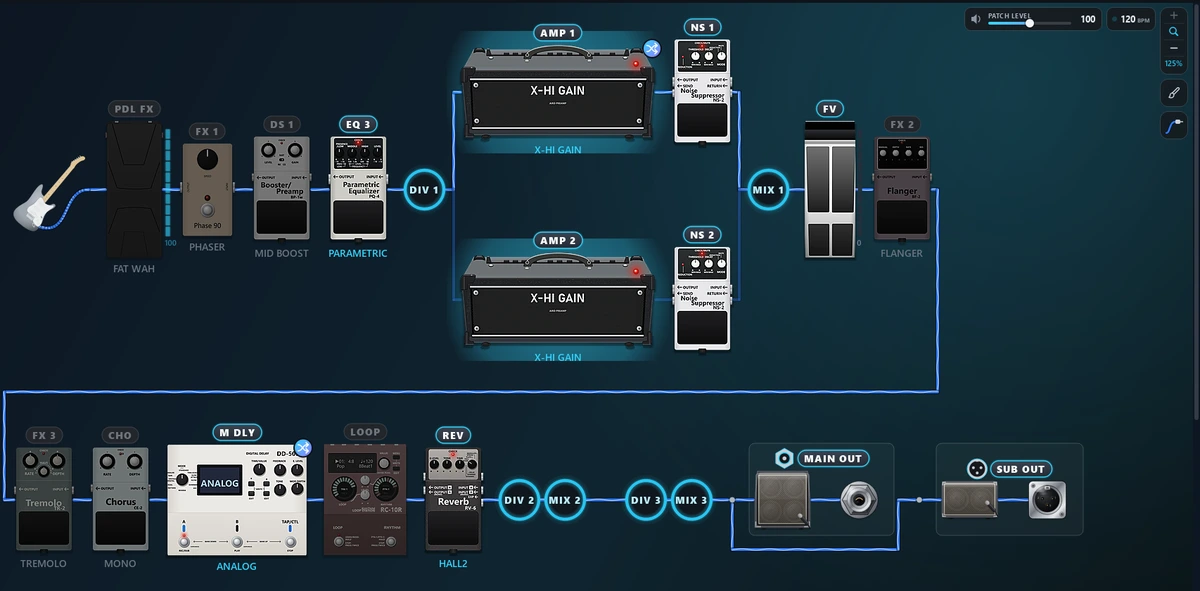
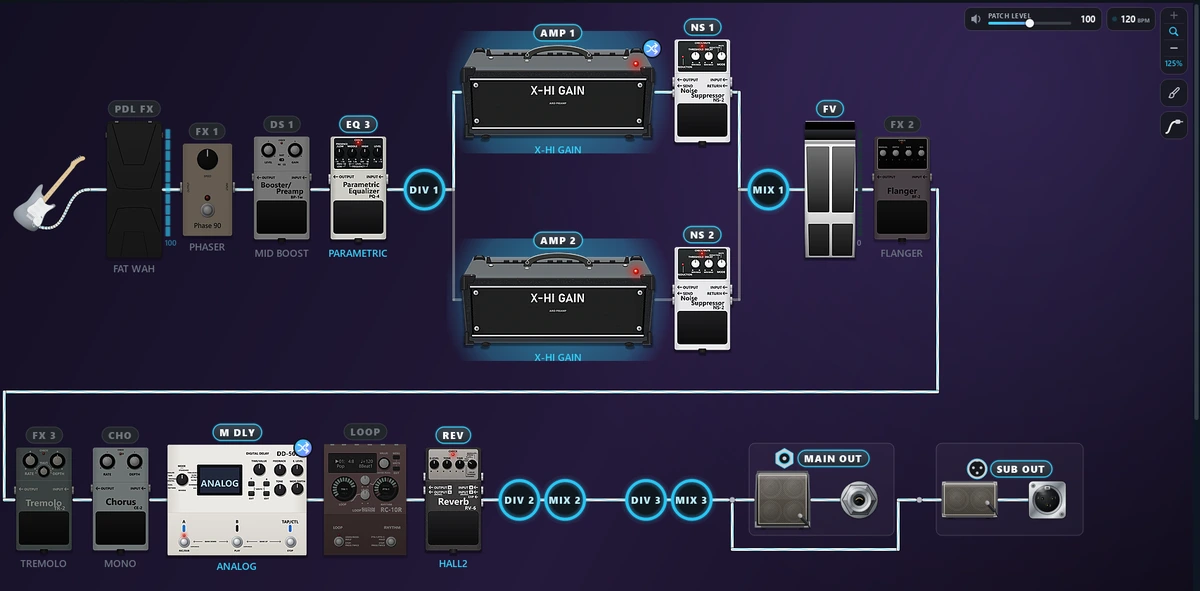
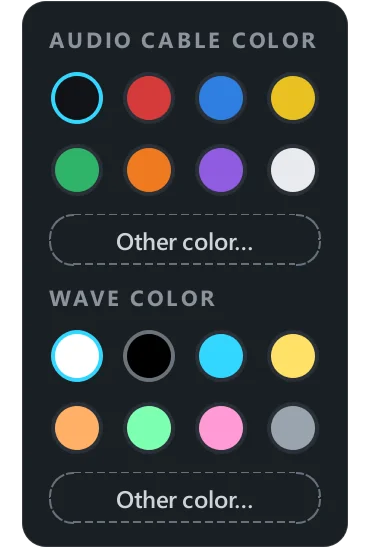
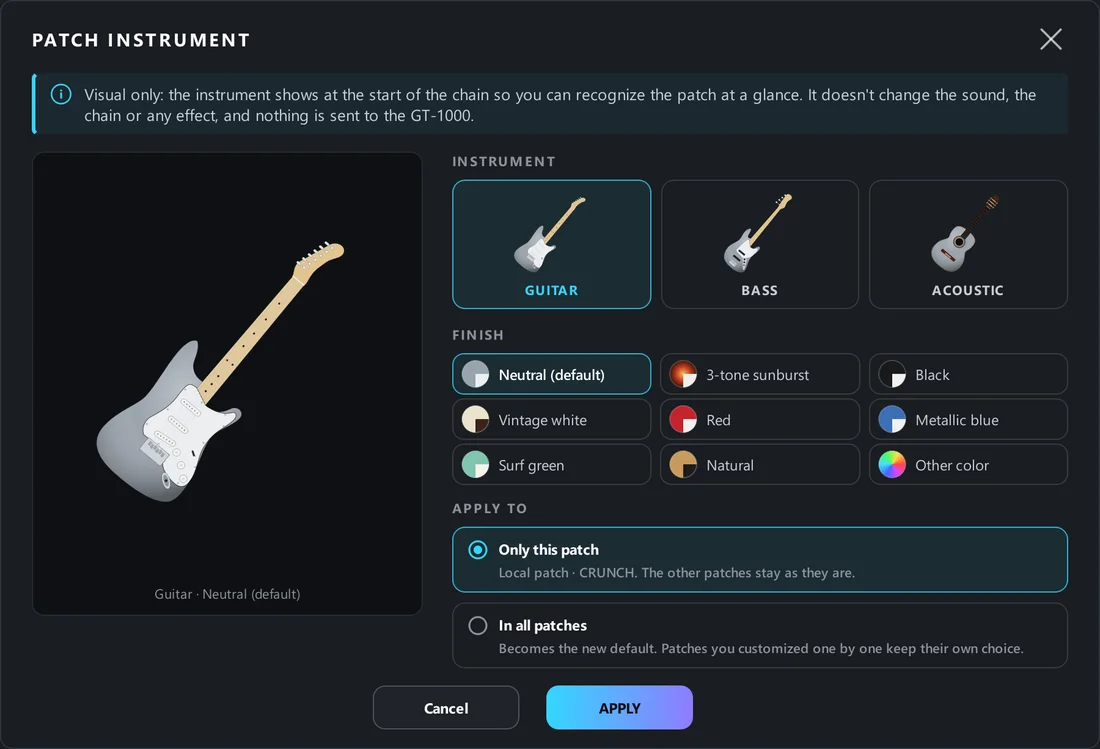
It's the tool you open every day, so it adapts to you. Choose the color of the audio cable and the wave running through it, the chain background and the instrument at the start of the signal.
- 8 cable colors and 8 wave colors, or any color from the palette
- Chain background palettes: petrol, amethyst, emerald, ember, graphite
- Electric, bass or acoustic guitar, with your choice of finish, on one patch or all
Your settings go with you
Everything you set up in the app is saved in the cloud, along with your license. New computer? Activate the license on it and find the app just as you left it.
Always the latest version, without chasing it
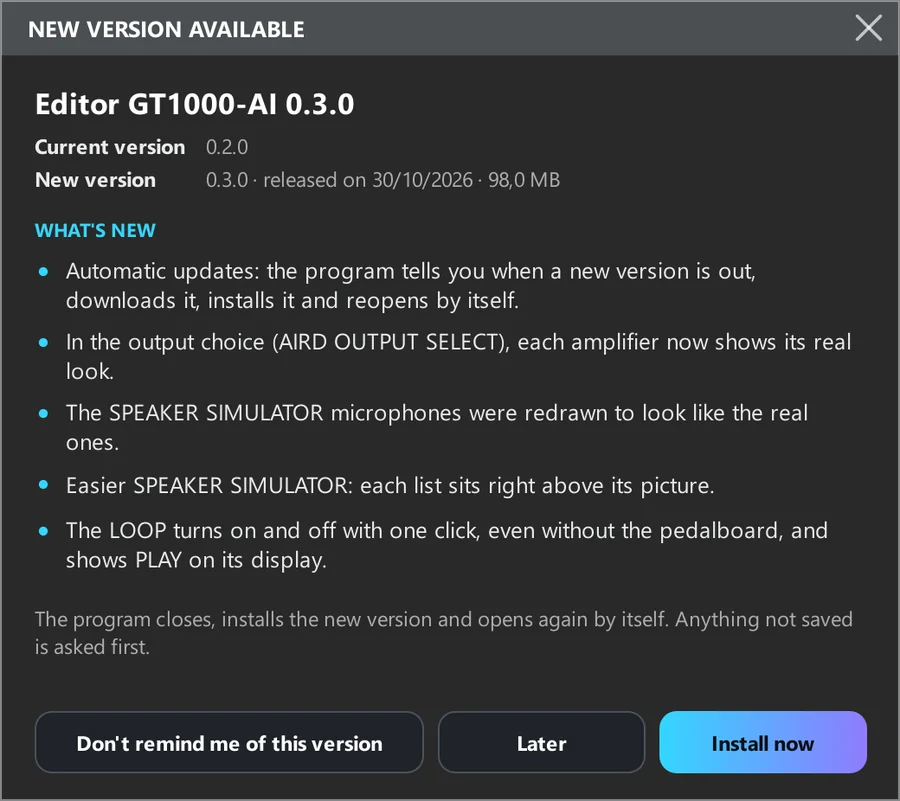
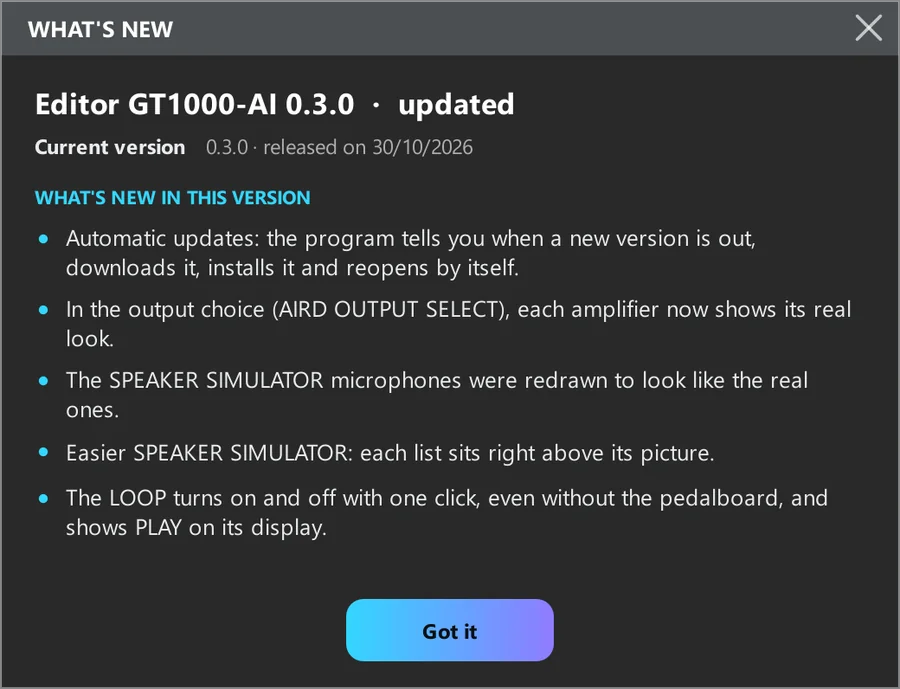
When a new version is out, the app tells you and shows what changed. One click and it downloads, installs and reopens by itself. After updating, the WHAT'S NEW window shows what arrived.
- Updates always free for license holders
- Anything not yet written is asked about before installing
No unit yet? Try it anyway
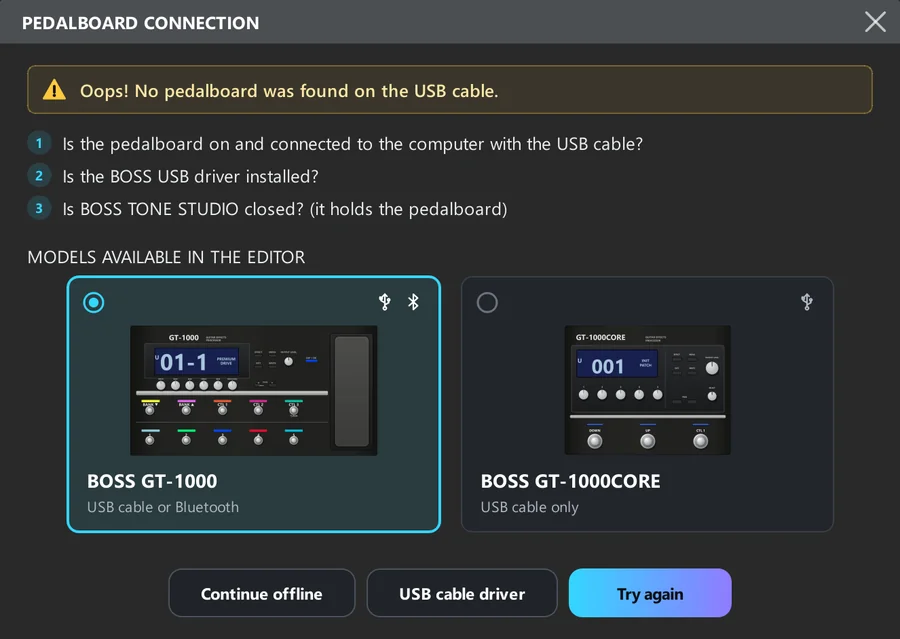
The app opens without the pedalboard connected. On the connection screen, click “Continue offline” and explore everything: the chain, the pedals, the amps, the hints and the MENU. Changes stay on screen until you connect.
And the rest of the unit, no hidden menus
MENU with every setting explained, tuner and outputs.
Full MENU
KNOB SETTING, INPUT, OUTPUT, MIDI, USB and the rest, with what each setting does.
Tuner
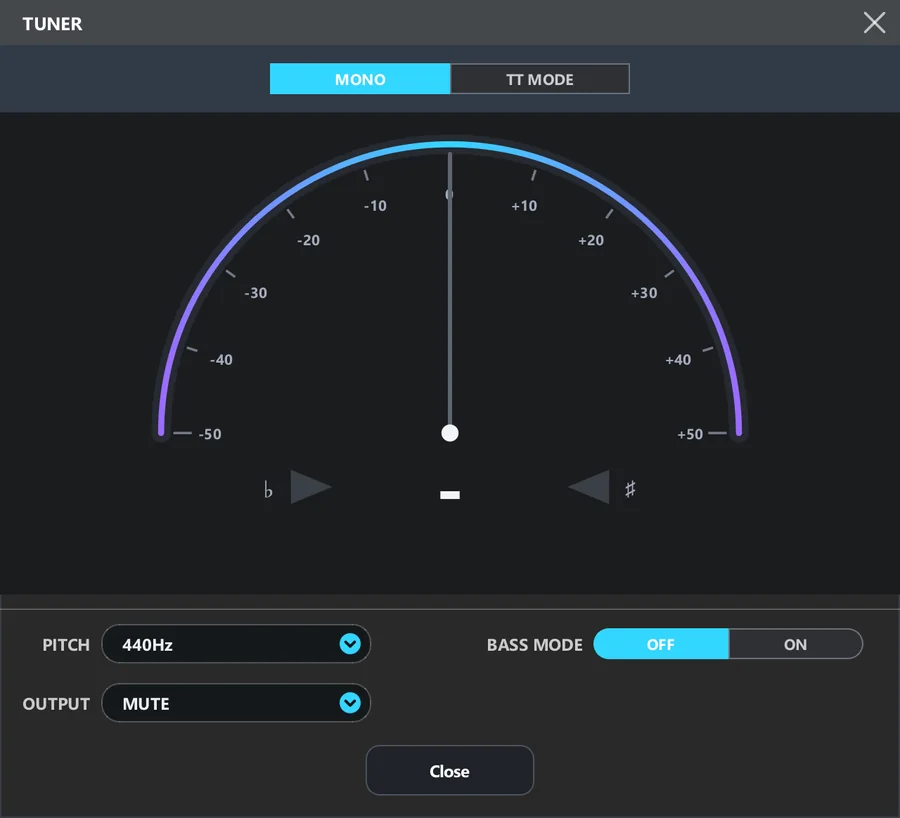
Redesigned tuner: a more modern arc look, with the needle gliding smoothly to the note.
The full list of what's in the editor
- Chain in the real order, with DIV, MIX and outputs
- Drag to reorder
- AVAILABLE row
- Zoom with the magnifier or Ctrl + wheel
- Panel that slides away like a tray
- 130+ drawn pedals and amps
- Stomp with animated lid and switch
- Expression pedal with meter
- MASTER drawn as a rack
- LOOP with PLAY on the display
- Large, readable knobs
- Number pad for the exact value
- Explanatory hint on every parameter
- Inspiration and artists for each model
- Parameters that don't apply are dimmed
- Right-click: default, type, assign
- COPY FROM ANOTHER PATCH
- REVERT
- STOMPBOX
- ASSIGN table with on/off per row
- Draggable rows, duplicate and clear
- Warning on real conflicts
- Assign from the pedal or the knob
- ASSIGN icon on the controlled pedal
- Count badge on CTL/EXP that opens the ASSIGN table
- Copy ASSIGNs from another patch
- LED colors with a color dot
- Three-column LIBRARIAN
- Import all 250 patches at once
- Send a whole liveset
- .tsl compatible with BOSS TONE STUDIO
- Drag .tsl into the window
- Export several in one file
- Backup of ALL DATA and STOMPBOX
- Automatic backup before WRITE
- REVERT to the last written state
- PANIC to unstick communication
- Offline mode
- Full MENU explained
- Modern arc-style tuner
- GLOBAL EQ
- AIRD OUTPUT SELECT with drawings
- SPEAKER SIMULATOR with cabinet and mic
- Cable and wave color
- Chain background palettes
- Electric, bass or acoustic guitar
- Settings saved in the cloud
- In 7 languages
- Automatic updates
See it in action
A quick overview and the full tour of every feature.
In 2 minutes
The essentials: describe the tone and the AI builds the patch.
Every feature
The full tour of the editor, in 5 minutes.
Describe the sound. The AI builds the patch on your GT-1000 or GT-1000CORE.
The editor is complete and 100% free. The AI is optional: it creates, tweaks, explains and answers questions about your patch, in English, straight to the unit over USB.
“less treble and a quieter delay”
TWEAKTREBLE 60→48DELAY 30→18An AI that talks with you about your sound
The AI is here to make things easier, and it's completely optional. Describe the sound and it builds the patch, tweaks only what you ask, explains every control and answers questions about the open patch, saving you hours of menus and trial and error. It's the only paid feature in the editor: everything else is free, and you can try it with 3 credits.
You describe it in English
A style, a song, an artist, or just “more bass and less hiss”. Tip: fill in MY GEAR (guitar, pickups, tuning and where you play) so the AI gets it right more often.
The AI builds and checks
It picks the amp, pedals and controls and reviews every parameter. If something comes out wrong, it fixes it before handing it to you.
The patch arrives ready
It shows up in the editor and already plays on the pedalboard, with what it did explained in text.
You decide whether to write it
Nothing goes into the unit's memory without your WRITE. Don't like it? Undo the last tweak.
The AI can make mistakes. The generated tones are a starting point, with no guaranteed result: the sound varies with your guitar, pickups, amplification and room. Listen at low volume and adjust to taste.

A real request: the Comfortably Numb solo
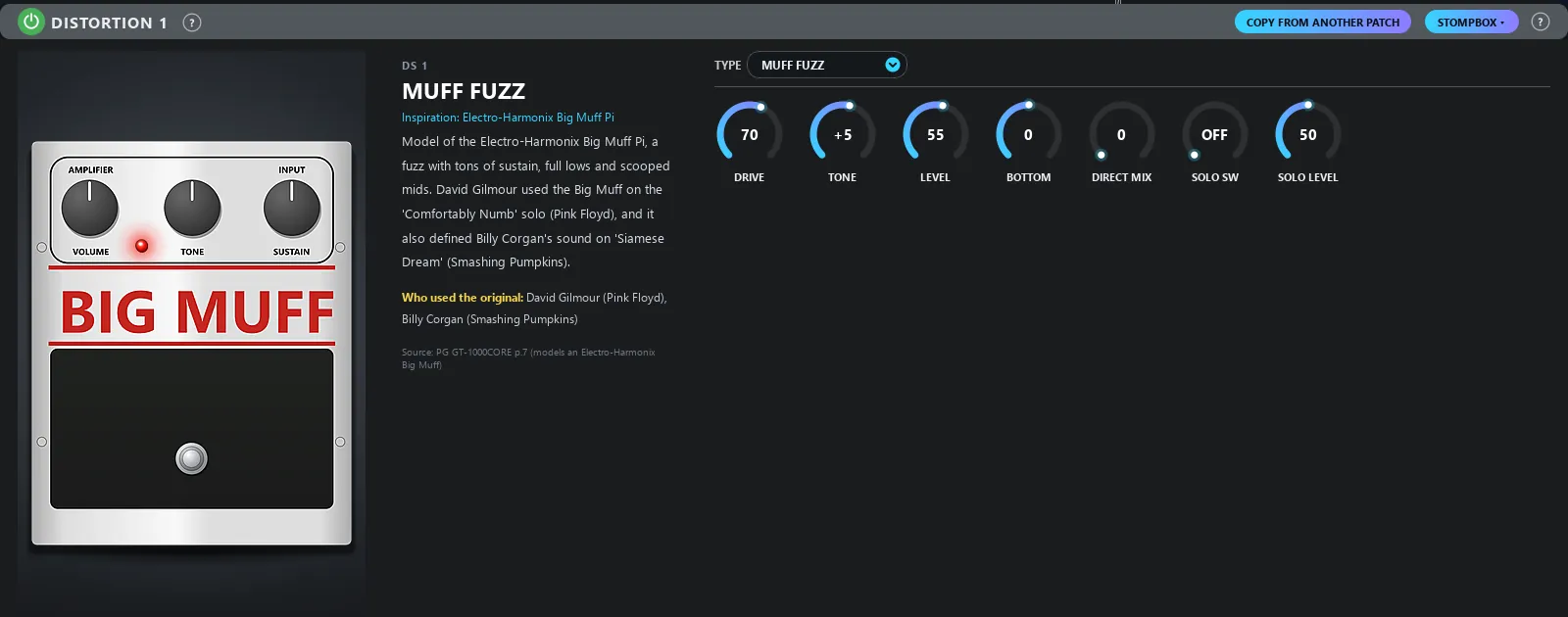 Big Muff DRIVE
What you can ask for
One credit per request, in any mode. The AI always works on the patch that is open.
- Automatic
Just type. The AI works out whether to create a new tone or change the open one.
- New tone
80s crunch with a short delay.
A new patch, built and checked. - Tweak
Less treble and a quieter delay.
Changes only what you asked for and shows the before and after. - Analysis
Why does it hiss when I stop playing?
Explains the cause without changing anything, and compares it with another of your patches. - EXPLAIN PATCH
Explains the patch in musician's terms: what to step on in the chorus, what the pedal does in the solo, what each control changes.
Every request stays in the history
Each request is saved with the patch and the date. Click one to reread the full question and answer, and filter to just the open patch.
- History saved to your account, on any computer
- Type label: new tone, tweak or analysis

EXPLAIN PATCH: the patch explained the way a bandmate would
One click and the AI tells you how to use the patch in the song, what each control does and a tip for sitting in the band mix.
- The explanation is saved: reopening the same patch costs no credit, even on another computer
- Comes with the technical walkthrough too

* No external AI neededThe AI comes built into the Editor and runs through our own server. You don't need an API key, a ChatGPT or other AI account, or any setup. The license includes 30 credits, and when they run out you buy more packs right in the Editor, without paying for the license again.
* About the AI tonesThe AI builds a complete base for the tone you described, but every rig sounds different. Guitar, pickups, amp, cabinet, headphones and volume all change the result. That's why some fine-tuning may be needed, and the Editor lets you change everything or ask the AI to adjust it.
LEVEL VOLUME: no patch blows up at the gig
The app measures your patches through the USB audio and matches the PATCH LEVEL of all of them to a reference patch. What took an afternoon by ear is done in minutes.

The editor is free. You only pay if you use the AI in the editor, which is completely optional.
Editing patches, building the chain, organizing in the LIBRARIAN, backups and everything else is free, forever, with no limits. The AI is an optional extra: you download with 3 credits to try it. If you like it, buy the license once, which comes with 30 credits and also unlocks LEVEL VOLUME. After that, if you need more, just top up with a pack.
Download free
The full editor, forever, without paying anything. Plus 3 credits if you want to try the AI.
The AI license
Only for those who want to use the AI. Lifetime, no subscription and it already comes with 30 credits. It unlocks LEVEL VOLUME, and app updates are always free.
More AI credits
For those who already have the license and want to keep using the AI. The license stays valid, and the packs work together with it.
Packs don't replace the license. To use the AI beyond the 3 trial credits, your first purchase is the license. It already includes 30 credits; packs only top up once those run out.
You never pay for the license again. Credits don't expire, and the editor keeps working even with zero credits.
What each thing costs
| AI request: new tone, tweak or analysis | 1 credit |
| EXPLAIN PATCH: one patch explained | 1 credit |
| Reopening the explanation of the same patch, even on another PC | free |
| LEVEL VOLUME | 1 credit |
| If the patch comes out with an error, the AI reviews and fixes it before delivering | free |
| Error, cancellation or a response that never arrived | refunded |
| Editing, organizing, LIBRARIAN, backup and everything else | free |
The rules, no fine print
- License for 1 computer, with up to 3 transfers per year.
- Needs internet to open; once open, it keeps editing even offline.
- Up to 50 AI requests per day.
- History, patch explanations and preferences follow your account to any PC.
- 7-day guarantee through Hotmart.
Start for free. The AI, only if you want it.
The full editor is free. The license and packs are only for using the AI beyond the 3 trial credits.
Editor, always free
Everything, no limits and no subscription
- Full editor, forever
- Unlimited editing, LIBRARIAN and backup
- 3 credits to try the AI
Optional AI
Only if you want to use the AI · you already get 3 free credits to try it
- Comes with 30 credits
- LEVEL VOLUME
- Updates always free
- No subscription
- Requires the license
- Never expire
- Buy with your license e-mail
Install in two minutes
To connect to the pedal, it needs the official BOSS firmware (System Program) version 4.00 or newer on the GT-1000, or 2.00 or newer on the GT-1000CORE. The update is free on the BOSS website.
Windows 10 and 11
- Install the GT-1000/GT-1000CORE USB driver from the BOSS website.
- Open the installer and choose your language.
- If “Windows protected your PC” appears, click More info and then Run anyway.
macOS 13 or newer
- Open Terminal: press Cmd + Space, type Terminal and press Enter.
- Paste the line below and press Enter. The app is downloaded, installed in Applications and opens by itself, with no Mac block.
curl -fsSL https://gt1000ai.com/mac.sh | sh- Bought it? Activate with your purchase e-mail and the code that starts with HP.
Can't use Terminal? Download the .dmg: Apple Silicon · Intel. Some people have reported problems with the .dmg (the Mac says the app is damaged). If that happens to you, install with the Terminal line above.
Before you download: your gear is your responsibility
Editor GT1000-AI sends commands and writes patches and settings to your GT-1000 or GT-1000CORE. By downloading and using the app, you take full responsibility for its use and for your gear: multi-effects unit, amplifier, speakers, headphones, interface, computer and your data.
The developer is not liable for damage or defects in equipment, hearing damage from high volume, loss of patches, settings or backups, or for losses in rehearsals, recordings or shows.
- Always start with the volume low, especially with new AI patches
- Use headphones with care
- Back up the unit before big changes
- Check every patch before taking it to rehearsal or the stage
It's in section 6 of the Terms of Use (in Portuguese), which you accept when installing. This does not remove the rights guaranteed by Brazil's Consumer Protection Code.
Compatibility: works with the BOSS GT-1000 and the BOSS GT-1000CORE. The app recognizes the model when it connects and shows only the controls your unit has.
Versions
What changed in each version of the app.
Version 1.0.2Nov 18, 2026Latest
- Fixed: on Mac, LEVEL VOLUME now finds the GT-1000 and the GT-1000CORE. On the first measurement macOS asks for microphone access; that's how the editor hears the pedal.
- Fixed: the program is much lighter, especially on Mac, and uses far less processor with the chain open.
- Fixed: the output screens (MAIN/SUB OUT) no longer flicker with the pedal connected.
- Fixed: on the GT-1000CORE, the SUB output always shows as it really is, also when the pedal connects after the editor opens.
- Improved: when LEVEL VOLUME can't find the pedal, the message explains better what to check and lists the audio devices found on the computer, to make helping easier.
- Other bug fixes.
Version 1.0.1Nov 15, 2026
- Several improvements and calibrations to the AI's answers.
- New: the top bar now shows the program version. If you support the project with a license, the PREMIUM badge appears next to it and the editor gets the gold finish.
- New: LEVEL VOLUME unlimited for license holders — level as many patches as you like, with no credits spent.
- New: a screen just for your license, under TOOLS: your balance, what it unlocks and which computer it is activated on.
- New: activating the license now opens a thank-you screen — because it is your purchase that keeps the project alive.
- New: in the new-version notice, a button takes you to the site with every version and everything that changed in each one.
- New: when reporting a problem you can leave your e-mail, if you want, so the developer can get back to you about that report.
- On the GT-1000CORE the outputs now appear as they really are: SUB goes out through the jacks, and the editor shows when each side of it is available.
- Fixed: some changes made in the program did not reach the pedal in specific situations.
- Fixed: screen, title and text touch-ups in all seven languages, and more stability on macOS.
Version 1.0.0Nov 13, 2026
- New: the editor now supports IRs — your IRs show up by name in the cabinet simulator list, and the picker opens in two columns: factory cabinets on one side, your own IRs on the other.
- New: IR badge in the chain — one look and you know that sound is going through one of your IRs, and which.
- New: automatic backup on every write. The icon next to the BPM opens the list, shows what changes if you go back and restores it in one click.
- New: after WRITE the editor confirms in the middle of the screen that the patch was saved, and Ctrl+S writes too.
- New: the ASSIGN screen now matches the pedal's own display, with copying from another patch, back to default and pulling a single ASSIGN into the row you choose.
- Fixed: changing an ASSIGN in the program never reached the pedal, and dragging a row duplicated another.
- Fixed: after CLEAR, the WRITE button stayed dim and the target always came up as U01-1.
- Fixed: opening a block's STOMPBOX and cancelling froze the program for about 10 seconds.
- On screen: more room for the chain — the effect drawer now has a fixed height and the pedals got bigger; the amp panel grew with it, without taking any more space.
- In the unsaved changes warning, the save button is now the same WRITE from the patch bar.
- On screen: the effect drawer now opens and closes with a smoother movement, and has an X on its bar to close the block.
- Also on screen: curved cable, gradient background by default, TOOLS became a gear (with PANIC inside) and the premium features now sit in one frame with your credit balance.
Version 0.6.5Nov 12, 2026
- New: Report a problem in the TOOLS menu, which sends the program logs to the developer in one click.
- Fixed: the editor could freeze with some patches while playing with the pedal connected.
- Fixed: with the program in Spanish, the AI result sometimes came without the explanation.
- Translation fixes in several languages and buttons with cut-off text.
Version 0.6.4Nov 11, 2026
- Fix for a memory leak in a specific scenario.
- Faster AI: fewer automatic corrections in responses.
- Fix for the "Connection required" message on some Windows PCs.
Version 0.6.3Nov 11, 2026
- Now works with the GT-1000 on version 4.00 and the GT-1000CORE on 2.00.
- POLY tuner for those on 4.00 or 2.00.
- Badge with the pedal's firmware in the corner of the screen.
- Fixes for .tsl import and error messages.
Version 0.6.2Nov 10, 2026
- Faster AI for requests made in other languages.
- Clearer firmware message.
Version 0.6.1Nov 10, 2026
- Fix: on some computers the program wouldn't open because of a connection issue.
Version 0.6.0Nov 10, 2026
- Bluetooth connection: connect the GT-1000 without a cable. Patch changes are fast, and the window shows step by step how to turn on Bluetooth on the pedalboard. Sound on the computer (audio interface) and NIVELAR VOLUME still use the USB cable.
- Tap tempo and patch volume at hand: in the corner of the chain, the BPM blinks in the patch tempo. Click it to tap the tempo on the TAP button or use the mouse wheel. Next to it is the PATCH LEVEL bar. Everything follows MASTER instantly.
- KNOB SETTING with your pedalboard: a drawing of the GT-1000 or GT-1000CORE with numbered knobs, so you instantly see what each one controls.
- MASTER DELAY with its own look: it now appears as a DD-500, with the type shown on its display, so it doesn't get mixed up with the chain delays.
- More precise AI tweaks: it changes only what you asked for, doesn't repeat controls and, when swapping an effect, puts the new one in the same place.
- Clearer startup: while looking for the pedalboard, "Searching for devices…" appears.
- A .tsl file that won't open: the program asks if it can send the file so we can find out why.
Version 0.5.0Nov 8, 2026
- New languages: the editor is now available in Russian, German, French and Italian, including screens, parameter explanations, Terms of Use and the installer. The AI also answers in the chosen language.
- New tuner: an arc design that is easier to read from a distance, with a needle that glides smoothly to the note.
- Language change: when you confirm the restart, the program now opens again by itself.
- More stability: fixed an error that could appear when moving an amp knob while the unit was changing patches.
Version 0.4.0Nov 6, 2026
- The AI now uses every Master Delay type, like PAN, Tape, Analog, Shimmer and Space Echo, and every FX type, like Slicer, Ring Mod and Sitar.
- New My gear: set your guitar, pickup and tuning in a few clicks, and the AI builds the patch with your gear in mind.
- The AI screen shows the MAIN and SUB outputs, and the AI respects your unit's AIRD OUTPUT SELECT.
- The AI screen now notes that the result may need fine adjustments, depending on your gear.
- Clearer connection screen: it shows right away which unit is connected.
Version 0.3.2Nov 4, 2026
- Fix for the automatic new-version notice when opening the app.
Version 0.3.1Nov 4, 2026
- Stability and performance improvements when opening the app.
- Internal adjustments to server communication.
Version 0.3.0Nov 3, 2026
- BOSS GT-1000CORE support: the program recognizes the CORE when it connects, shows its drawing and only the controls it has ([▼] [▲] buttons, CTL1, the CTL2-CTL5/EXP1-EXP2 inputs and 5 knobs), numbered U001 to U250.
- On the GT-1000CORE: both inputs (INPUT R/MONO and L) with the DIVIDER ROUTING, SEND 1/2 as SEND or SUB OUT, OUTPUT and SEND/RETURN GROUND LIFT and PATCH EXTENT in the MENU.
- AI, HOW TO USE and LEVEL VOLUME work on the GT-1000CORE, with its own rules and controls.
- Updated to BOSS's latest MIDI Implementation (GT-1000 4.02 and GT-1000CORE 2.02).
- Automatic updates: the program tells you when a new version is out, downloads it, installs it and reopens by itself.
- In the output choice (AIRD OUTPUT SELECT), each amplifier now shows its real look.
- The SPEAKER SIMULATOR microphones were redrawn to look like the real ones.
- Easier SPEAKER SIMULATOR: each list sits right above its picture.
- The LOOP turns on and off with one click, even without the pedalboard, and shows PLAY on its display.
Version 0.2.0Nov 2, 2026
- First public release of Editor GT1000-AI for the BOSS GT-1000, for Windows and Mac.
- Complete free editor: visual chain, drawn amps and pedals, CTL/EXP and ASSIGN, LIBRARIAN with livesets, MENU, tuner and backups.
- AI that creates, tweaks and explains tones, HOW TO USE and LEVEL VOLUME with the lifetime license.
- In Portuguese, English and Spanish.
Frequently asked questions
Is the editor really free? Is there a subscription?
Yes. The whole editor is free, forever, with no subscription and no limits. Only the AI (and LEVEL VOLUME, which comes with it) uses credits, and it's optional: you download with 3 credits to try it.
Does it work with the GT-1000CORE?
Yes. The app works with the BOSS GT-1000 and the BOSS GT-1000CORE, including the AI, EXPLAIN PATCH and LEVEL VOLUME. It recognizes the model when it connects and shows only the controls the unit has.
Can I use it without the unit?
Yes. Click “Continue offline” and explore the whole app. Changes stay on screen until you connect the pedalboard.
Is there a Mac version?
Yes, also free, for Apple Silicon and Intel. If you have the AI license, it works on the Mac too. Just download the one for your machine in the install section.
Does it open BOSS TONE STUDIO files?
Yes. It imports and exports compatible .tsl files, keeping ASSIGN, LED, CTL and memo.
Do I need internet?
To open the program, yes, including the free version: it checks the version and your account with the server. Once it's open, you can keep editing even if the internet drops. The AI uses the internet.
Can the AI ruin my patches?
Nothing goes into the unit's memory without WRITE, the app backs up before writing, and you can undo the last tweak or REVERT everything.
Who is responsible for my gear?
You are. The app writes patches and settings to your pedalboard, and whoever downloads and uses it takes responsibility for its use and the gear. Start with the volume low and back up before big changes. The details are in section 6 of the Terms of Use.
I switched computers. Do I lose my settings?
No. Preferences, AI history, patch explanations and the chain's look are saved to your account. If you have the AI license, deactivate it on the old computer and activate it on the new one (up to 3 changes a year), and everything is there.
To use the AI, can I buy just a credit pack?
No. The packs are for those who already have the AI license, which comes with 30 credits; they only top up later. The editor stays free with or without them.
If I use the AI, do I pay for the license again when the credits run out?
No. The AI license is paid once. After that, if you want to keep using the AI, just buy a 50 or 100 credit pack. With no credits, the editor keeps working normally.
Who made it
I'm Rodrigo Estulano. I've worked as a software developer for over 7 years and I'm also a musician. I built Editor GT1000-AI as an independent project to bring the two together: a faster, more visual way to dial in tones on the GT-1000, and an AI that understands what a musician asks for. Every feature here came from a real struggle while building patches.
Support: rodrigoestulano02@gmail.com